
Licenses
Licenses Photos

| License Type | STANDARD | SPECIAL LICENSES: | |||||||
| License Name | Standard | Basic | Enhanced | Extended | Universal | ||||
| License Representing Icon | SL | BL | EL | TL | UL | ||||
| Image Size* (from) |
ORIGINAL | ORIGINAL | ORIGINAL | ORIGINAL | ORIGINAL | ||||
| Price in $ (from) |
1 | 9 | 12 | 16 | 20 | ||||
| Numbers of Allowed Copies Used in Resale/Commerce | 0 | 500 | 25,000 | 100,000 | unlimited | ||||
| Use in Resale of Multiple Products* |  |
|
|
|
 |
||||
| Permitted Uses: | |||||||||
| Any Personal Use | |
|
|
|
|
||||
| Web Site / Template Design*/ Blog Illustration | |
|
|
|
|
||||
| Screensaver | |
|
|
|
|
||||
| Digital Advertising | |
|
|
|
|
||||
| Print Advertising | |
|
|
|
|
||||
| Book / Flyer / Sticker | |
|
|
|
|
||||
| Press Article | |
|
|
|
|
||||
| Multimedia Presentation | |
|
|
|
|
||||
| Printed Document | |
|
|
|
|
||||
| Printed Decoration | |
|
|
|
|
||||
| Within Software / Online Software, Resale/Commercial | |
|
|
|
|
||||
| Mugs / T-shirts / Hats / Posters, etc., Resale/Commercial | |
|
|
|
|
||||
| Art Prints, Resale/Commercial | |
|
|
|
|
||||
| Any Other Usage of Purchased Content, Resale/Commercial | |
|
|
|
|
||||
Content Download Agreement
This license agreement is between You (“User”, “You”) and Freemarket (Switzerland) GmbH (“Freemarket”, “we”, “us”) which operates the website of Fantero.com ( “Website"), and governs the use of non-watermarked images, photographs, illustrations or other forms of art and all other content on the Site ("Content") which are intended for sale or shared and downloaded from Fantero.com. By downloading such Content You agree to be bound by the terms of this License Agreement and the User Agreement, without any other conditions or declarations. If You do not agree with these terms and conditions, You must not download any Content from the Website. This License Agreement should be read in conjunction with the User Agreement and the Privacy Policy which also apply to Users.
All Content on the Website is copyrighted and it is the property of Freemarket or its Content providers. All rights are reserved unless otherwise granted to Users. The services that Freemarket provides to Users are subject to this License Agreement (together with the User Agreement). Freemarket reserves the right to update this License Agreement at any time with notice to User's account. The most current version of this License Agreement can be reviewed by clicking on the "Content download license agreement" hypertext link located at the bottom of our Web page.
Freemarket may update this License Agreement by posting an amended License Agreement on the Website. Such updated version will be effective at the time of posting. Freemarket hereby grants to a User a perpetual nonexclusive, non- transferable license to use and reproduce the Content which is intended for sale under the terms and conditions explained in this License Agreement. User's rights to use the Content are conditioned upon User's payment to Freemarket for his or her use of such Content.
Standard license conditions:
- Permitted Uses:
- For User's own personal, non-commercial use.
- In websites designs, multimedia presentations, consumer merchandise, broadcast film and video, mobile phones themes and toolbar skins.
- In website or PowerPoint templates. User may use Content in templates that User intend to sell, but may not distribute the full sized images apart from template. User has to purchase the Content every time when he or she is going to use it in new, different templates.
- In printed promotional materials, magazines, newspapers, books, e-books, brochures, catalogs, set designs, flyers, CD or DVD cover art, product packaging, business cards, invitations, letterheads.
- In home, office or public place decor, on a canvas or other material to be used as decoration and not resold.
- For other uses that depend upon importance of a Content in User's project: where the Content is not used as a heart, main point of a product (provided that the Content is not used as a trademark or logo).
- User may also:
- Modify or alter Content for his or her use.
- In the event of creating of a derivative work based on one or more photographs integrated into this derivative work all rights to such Content shall continue to be owned by Freemarket and its providers.
- Display the Content in any manner not prohibited by the permitted uses of this License Agreement provided that User includes the copyright information from the Content file in the legal copyright notice.
- Print a temporary copy of a file that is integral to your work product and without which the product could not be completed.
- Print a copy of the Content for User's own use in any size, however User may not resell, sublicense or redistribute it to others.
- Prohibited uses
- USER MAY NOT USE THE CONTENT IN THE FOLLOWING WAYS:
- Use the Content other than as specified in Permitted Uses without a Special License.
- Use the Content in connection with any service designed to sell "print on demand" products to a number of users: such as a posters, greeting cards, postcard, greeting card, on a t-shirts, mugs, mouse pads, hats, art prints, paintings, calendars, books, or galleries and screensavers without a Special License.
- Resell, redistribute or transfer any Content except as provided in this License Agreement. Displaying Content in digital format in resolution greater than 800 x 600 pixels without legal copyright notice, or share the Content by providing access to it on shared disk drives, computer networks.
- Use a Content in unlawful or immoral way with violation of the rights of others such as defamation, pornography, intrusion on privacy or in a manner that infringes any trademark or intellectual property or use a Content in a way that places any person in such Content in a bad light or depicts them in a way that they may find offensive.
- Use any part of Content as a trademark, service mark, logo, or part thereof.
User has to re-license (re-purchase) the Content each time it is used in a new project or product, with only exception of purchasing of the Content under Special Universal License.
If User wants to use purchased Content in connection with the production of any items prohibited by this Standard License, or User wants to sell items containing purchased Content User has to obtain one or more Special Licenses, which support extended needs. We offer a variety of Special Licenses thus User may choose which of them is most suitable.
Special license conditions:
(BL)Basic License:
User may print up to 500 copies of the Content on items for resale such as postcards, mugs, t-shirts, hats, posters, mouse pads, calendars, art prints or similar products even if the Content is the main part of a project. User may also use licensed Content within software or online software that is intended for resale (number of copies set above still apply). If User exceeds the amount of allowed prints or copies, the license must be re-purchased again. All other Prohibited uses uses from the Standard license conditions still apply. The Content purchased under this License can be used in connection with one product or item only.
(EL)Enhanced License:
User may print up to 25,000 copies of the Content on items for resale such as postcards, mugs, t-shirts, hats, posters, mouse pads, calendars, art prints or similar products products like Cafe Press. User may also use licensed Content within software or online software that is intended for resale (number of copies set above still apply). If User exceeds amount of allowed prints or copies, the license must be purchased again. All other Prohibited uses from the Standard license conditions still apply. The Content purchased under this License can be used in connection with one product or item only.
(TL)Extended License:
User may print up to 100,000 copies of the Content on items for resale such as postcards, mugs, t-shirts, hats, posters, mouse pads, calendars, art prints or similar products products like Cafe Press. User may also use licensed Content within software or online software that is intended for resale (number of copies set above still apply). If User exceeds amount of allowed prints or copies, the license must be purchased again. All other Prohibited uses from the Standard license conditions still apply. The Content purchased under this License can be used in connection with one product or item only.
(UL)Universal License
User may print unlimited number of copies of the Content on items for resale such as postcards, mugs, t-shirts, hats, posters, mouse pads, calendars, art prints or similar products products like Cafe Press. User may also use licensed Content within software or online software that is intended for resale (amount of copies set above still apply). All other Prohibited uses from the Standard license conditions still apply. The Content purchased under this License can be used in connection with multiple products or items.
Prices and explanation table is available in our Price Chart. Freemarket reserves the right to update prices at any time. User may not resell the Content, which was purchased under any License offered by Freemarket as photos or digital images online.
Only User is permitted to use the Content. "Non-transferable" means that except as provided in Agreement, User may not sell, rent, give, sublicense, or transfer to anyone, the Content or the right to use the Content.
User acknowledges that by purchasing a Standard License or one of our Special Licenses to use the Content file from Fantero.com the ownership of this Content is not transferred to User in any way.
Freemarket may require a written Model Release or Property Release for Content that has identifiable people or easily recognizable private property on it. Freemarket does not represent or make warranties whatsoever as to the legality or validity of any Model or Property Release associated with Content except as provided in this Agreement or the User Agreement.
The User acknowledges that Freemarket has no rights to license shared Content to third parties. In case of downloading of shared Content from sharing section of the Website User may not use, store, display, publish, transmit, distribute, modify, reproduce, create derivative works of any such Content, in whole or in part, otherwise as provided to User as part of the sharing services on Fantero.com.
Freemarket shall have the right in its sole discretion to edit, refuse to post or remove any content submitted to or posted on website. Without limiting the foregoing, Freemarket shall have the right to remove any material that Freemarket, in its sole discretion, finds to be in violation of the provisions hereof or otherwise objectionable.
Force majeure - neither party will be responsible for any failure or delay in performance due to circumstances beyond its reasonable control, including, without limitation, acts of god, war, riot, embargoes, acts of civil or military authorities, fire, floods, accidents, service outages resulting from equipment and/or software failure and/or telecommunications failures, power failures, network failures, failures of third party service providers (including providers of internet services and telecommunications). The party affected by any such event shall notify the other party within a maximum of fifteen (15) days from its occurrence. The performance of this agreement shall then be suspended for as long as any such event shall prevent the affected party from performing its obligations under this agreement.
- Indemnification
User agrees to defend, indemnify and hold harmless Freemarket, its affiliates and their respective directors, officers, employees and agents from and against all claims and expenses, including attorneys' fees, arising out of the use of Fantero.com by User or User's Account.
- Termination
Either Freemarket or User may terminate this License Agreement at any time. Without limiting the foregoing, Freemarket shall have the right to immediately terminate User's Account in the event of any conduct by User which Freemarket, in its sole discretion, considers to be unacceptable, or in the event of any breach by User of this License Agreement or the User Agreement. Upon termination of User's access to his or her portions of the Site, User agrees to forfeit all download credits remaining in User's account.
- Acknowledgement
You acknowledge that you have read this content download license agreement, understand it, and agree to be bound by its terms and conditions.
- Copyright Notice
Fantero and its logos are trademarks of Freelancer Technology Pty Ltd. All rights reserved. All other trademarks appearing on Fantero.com are the property of their respective owners.
Any rights not expressly granted herein are reserved.
- Applicable Law
The site is operated by Freemarket (Switzerland) GmbH in accordance with the laws of Switzerland. Persons who choose to access the Site from other locations do so on their own initiative, and are responsible for compliance with local laws, if and to the extent local laws are applicable.
Any dispute arising out of or in connection with this Content Download License Agreement shall be governed by the laws of Switzerland. You and the Store irrevocably submit to the non-exclusive jurisdiction of the courts of Switzerland.
Content Upload Agreement
This is a legal agreement between You (Member), who uploads photographs, images, illustrations ("Content") for Fantero.com and the owners of Fantero.com ( or "Website"), which governs the uploading of images, photographs, illustrations or other forms of art ("Content")on a non-exclusive basis. By submitting a Member's account application Member agrees that he or she is 18 years of age or over and can legally accept this agreement and agrees to be bound by the terms of this Agreement, which may be amended from time to time without any other conditions or declarations. Each upload of Content will be governed by the terms and conditions of this Agreement. If Member does not agree with these terms and conditions, he or she has to terminate a Member's account. A copy of this agreement has to be printed for your records.
- Uploading Content
- Content intended for sale
By uploading photographs, illustrations, video files, animations, data files, and other material ("Content") to Fantero.com, Member gives Fantero.com, a perpetual, world-wide, non-exclusive privilege and license to use, reproduce, publish, market, sublicense and sell to third parties any Content uploaded or moved by Member to the sale folder in accordance with our Content Upload Rules and accepted by Fantero.com.
The Member acknowledges that all uploaded Content shall be screened by Fantero.com and Fantero.com in its sole discretion, shall decide which of such Content is suitable for posting on the Website and distribution. The Member also acknowledges that Content may be used for sales, marketing and promotional purposes for the Website without compensation due to the Member for use of the Content for such purposes. Fantero.com may abstain from any or all of the preceding without any liability to Member.
Fantero.com and Member agree that all copyrights in and to all the Uploaded Content, including title, remain with the owner of such copyrights, and no copyrights is transferred in any way to Fantero.com or to the third parties.
The Member acknowledges that he or she is not allowed by Fantero.com to upload any Content that contravene any patent, copyright, property right, trademark or any other applicable right. Fantero.com requires a written Model Release or Property Release for Content that has identifiable people or easily recognizable commercial buildings, businesses or private property on it and is intended for sale. Fantero.com does not represent or make warranties as to the legality or validity of any Model or Property Release associated with Content. Member is solely responsible for the uploaded Content and by uploading the Content Member warrants that He or She owns all proprietary rights regarding the Content, and for Content that depicts identifiable persons or property that Member has obtained a valid signed Model or Property release from all required parties. Fantero.com reserves the right to remove any such Content from sale section of the Website that does not have a release.
Fantero.com also reserves the right to reject any accepted Content at any time if Fantero.com finds it's defective, of poor quality or contravenes any right, and the right to deny any account for any reason including fraudulent downloads, obscene materials and materials that can be harmful to others. Member also forfeits the right to remove submitted and approved for sale Content for 400 days since the date of initial upload. Fantero.com has sole right to remove such content if necessary. After 400 days has passed, member can remove the Content at any time for any reason at all by request to our Support.
Uploading of the Content found on other stock photography sites also results in the termination of this Agreement and your membership.
If the Content is uploaded on a non-exclusive basis - Member may submit the same Content to others parties such as websites or photo stocks. In case of cooperating with Fantero.com on an exclusive basis, uploaded Content may not be submitted to others.
- Shared Content
By uploading photographs, illustrations, video files, animations, data files, and other material ("Content") to the sharing folder of Fantero.com, Member gives Fantero.com, a perpetual, world-wide, irrevocable, non-exclusive privilege and license to use, store, display, reproduce, publish transmit, transfer, create derivative works, distribute any Content uploaded by Member in accordance with our Content Upload Rules. The Member acknowledges that Fantero.com has no rights to license shared Content to third parties.
The Member acknowledges that all uploaded Content shall be screened by Fantero.com and Fantero.com in its sole discretion, shall decide which of such Content is suitable for posting on the Website.
The Member also acknowledges that Content may be used for marketing and promotional purposes for the Website without compensation due to the Member for use of the Content for such purposes. Fantero.com may abstain from any or all of the preceding without any liability to Member.
Fantero.com and Member agree that all copyrights in and to all the Uploaded Content, including title, remain with the owner of such copyrights, and no copyrights is transferred in any way to Fantero.com or to the third parties.
The Member acknowledges that he or she is not allowed by Fantero.com to upload any Content that contravene any patent, copyright, property right, trademark or any other applicable right.
Fantero.com does not require any Model or Property Releases for shared Content.
Fantero.com also reserves the right to reject any Content at any time if Fantero.com finds it's contravened any right, and the right to deny any account for any reason including fraudulent downloads, pornographic or obscene Content and Content that can be harmful to others. Member also can remove shared Content at any time for any reason at all.
Uploading of the Content found on other stock photography sites is strictly prohibited and results in the termination of this Agreement and your membership.
- Commission
Fantero.com pays its Members commission based on the total of purchased in accordance with Albumo's.com Price Chart Content that uploaded by those Members. Fantero.com will do its best to make payment in 3 business days in response to a written request only. The minimum payout rate is $75. This payment will be net of fees for the processing of any credit card, debit card, or alternative payment method. In case of canceling of Member's account before reaching $75 in earnings, the amount of earnings will be forfeited.
Fantero.com reserves the right to change the commission and notify its Members by email of the change.
If any Member residing in the United States reaches $400 in payment for any given year - a W9 form will need to be submitted by fax in order to continue payments to that Member. An e-mail will be sent to Member with instructions on how to download and fax this IRS form.
- Member Account, Password, And Security
Member must complete the registration process by providing Fantero.com with current, complete and accurate information as prompted by the applicable registration form. Member also will choose a password and a Login name. Member is entirely responsible for maintaining the confidentiality of Member's password and account. Furthermore, Member is entirely responsible for any and all activities that occur under Member's account. Member agrees to notify Fantero.comimmediately of any unauthorized use of Member's account or any other breach of security. Fantero.com will not be liable for any loss that Member may incur as a result of someone else using Member's password or account, either with or without Member's knowledge. However, Member could be held liable for losses incurred by Fantero.comor another party due to someone else using Member's account or password. Member may not use anyone else's account at any time, without the permission of the account holder.
- Disclaimer of Warranty; Limitation of Liability
- Member expressly agrees that use of Fantero.com website is at Member's sole risk. Neither Fantero.com, its affiliates nor any of their respective employees, agents, third party content providers or licensors warrant that website will be uninterrupted or error free; nor do they make any warranty as to the results that may be obtained from use of Fantero.com, or as to the accuracy, reliability or content of any information, service, provided through Fantero.com.
- Fantero.com Grants no rights and makes no warranties with respect to the use of any names, trademarks, logotypes, copyrighted designs or works of art or architecture depicted in any content. It is Member responsibility to assure that all necessary rights, consents, or permissions as may be required for Member's use of any images are obtained.
- Fantero.com Provides its content on an "as is" basis without warranties of any kind, either express or implied, including, but not limited to, warranties of title or implied warranties of merchantability or fitness for a particular purpose, other than those warranties which are implied by and incapable of exclusion, restriction or modification under the laws applicable to this agreement.
- This disclaimer of liability applies to any damages or injury caused by any failure of performance, error, omission, interruption, deletion, defect, delay in operation or transmission, computer virus, communication line failure, theft or destruction or unauthorized access to, alteration of, or use of record, whether for breach of contract, tortious behavior, negligence, or under any other cause of action. Member specifically acknowledges that Fantero.com is not liable for the defamatory, offensive or illegal conduct of other Members or third-parties and that the risk of injury from the foregoing rests entirely with Member.
- In no event will Fantero.com, or any person or entity involved in creating, producing or distributing website or the Fantero.com content, be liable for any damages, including, without limitation, direct, indirect, incidental, special, consequential or punitive damages arising out of the use of or inability to use website. Member hereby acknowledges that the provisions of this section shall apply to all content on the site.
- Fantero.com shall have the right in its sole discretion to edit, refuse to post or remove any content submitted to or posted on website. Without limiting the foregoing, Fantero.com shall have the right to remove any content that Fantero.com, in its sole discretion, finds to be in violation of the provisions hereof or otherwise objectionable.
- In addition to the terms set forth above neither, Fantero.com, nor its affiliates, information providers or content partners shall be liable regardless of the cause or duration, for any errors, inaccuracies, omissions, or other defects in, or untimeliness or unauthenticity of, the information contained within website, or for any delay or interruption in the transmission thereof to the Member, or for any claims or losses arising therefrom or occasioned thereby. None of the foregoing parties shall be liable for any third-party claims or losses of any nature, including, but not limited to, lost profits, punitive or consequential damages.
- Force majeure - neither party will be responsible for any failure or delay in performance due to circumstances beyond its reasonable control, including, without limitation, acts of god, war, riot, embargoes, acts of civil or military authorities, fire, floods, accidents, service outages resulting from equipment and/or software failure and/or telecommunications failures, power failures, network failures, failures of third party service providers (including providers of internet services and telecommunications). The party affected by any such event shall notify the other party within a maximum of fifteen (15) days from its occurrence. The performance of this agreement shall then be suspended for as long as any such event shall prevent the affected party from performing its obligations under this agreement.
- Indemnification
Member agrees to defend, indemnify and hold harmless Fantero.com, its affiliates and their respective directors, officers, employees and agents from and against all claims and expenses, including attorneys' fees, arising out of the use of Fantero.com by Member or Member's Account.
- Termination
Either Fantero.com or Member may terminate this Agreement at any time. Without limiting the foregoing,Fantero.com shall have the right to immediately terminate Member's Account in the event of any conduct by Member which Fantero.com, in its sole discretion, considers to be unacceptable, or in the event of any breach by Member of this Agreement. Upon termination of Member's access to his or her portions of the Site, Member agrees to forfeit all download credits remaining in Member's account.
- Miscellaneous
This Agreement and any operating rules for Website established by Fantero.com constitute the entire agreement of the parties with respect to the subject matter hereof, and supersede all previous written or oral agreements between the parties with respect to such subject matter. This Agreement shall be construed in accordance with the laws of the State of California, without regard to its conflict of laws rules. No waiver by either party of any breach or default hereunder shall be deemed to be a waiver of any preceding or subsequent breach or default.
- Acknowledgement
You acknowledge that you have read this content download agreement, understand it, and agree to be bound by its terms and conditions. You further agree that it is the complete and exclusive statement of the agreement between you and Fantero.com, which supersedes any proposal or prior agreement, oral or written, and any other communication between you and Fantero.com relating to the subject of this membership agreement.
- Copyright Notice
Fantero and its logos are trademarks of Fantero.com. All rights reserved. All other trademarks appearing on Fantero.com are the property of their respective owners.
Model Release
Download Model Release and Property Release

Licenses all Stocks
1. Regular & Personal License
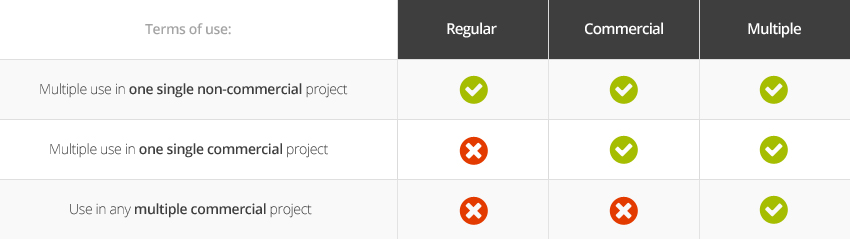
By purchasing a file(s) with this license, you are permitted to use it multiple times in one multimedia & website or any other project. You can use it for personal work or work for a client’s project that does not generate income. You are permitted to multiple use of purchased file(s) in one single non-commercial project. You are not permitted to redistribute this file(s) or functionality provided with the purchased product without the author’s written permission, but you may modify its content.
2. Commercial Single License
By purchasing a file(s) with this license, you are permitted to use it multiple times in one multimedia & website or any other project. You can use it for personal work or work for a client’s project that can generate income. You are permitted to multiple use of purchased file(s) in one single commercial project or non-commercial project. You are not permitted to redistribute this file(s) or functionality provided with the purchased product without the author’s written permission, but you may modify its content.
3. Multiple Commercial License
By purchasing a file(s) with this license, you are permitted to use it multiple times in multiple multimedia & websites or any other projects. You can use it for personal work or work for a client’s project that can generate income. You are permitted to multiple use of purchased file(s) in multiple commercial projects or non-commercial projects. You are not permitted to redistribute this file(s) or functionality provided with the purchased product without the author’s written permission, but you may modify its content.
Upgrade License
You are able to upgrade your license type at any time. Simply go to My Account / Buyer / Downloads and click upgrage icon. You will pay only the price difference between licenses.

